Understanding CSS Positioning part 1
Without a doubt, positioning, or the layout, is the hardest part of CSS. Not only because it ever so often varies between browsers, but also because CSS has a lot of ways to position an element, all with various (dis) advantages. This series of articles will thrive to explain the possibilities you have in positioning. It doesn’t only cover positioning, but also properties that define layout such as display and float, and a preview of the new CSS3 layout modules.
This part will introduce the positioning and display property. Part two, which will be published next week, will go more in-depth with the display attribute and delve into the float property. The last part, published the week thereafter will be a preview to the new CSS3 layout modules.
Display:hehwha?;
Before we start, it is worth noting that there are basically two types of ways to display an element in CSS: block and inline.
Display:block;
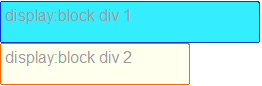
Block can be, quite literally, seen as a block. It has a specified width and height, optionally controlled by its content, but dimensions set by CSS have prevalence. Another property of elements with display:block is that they do not allow elements on the same “line” as their own. So while an element might have a small width, The next element will always be placed under it. So two simple divs with display block look like this:
Display:inline;
Display:inline is somewhat the opposite. Elements with display:inline always take their width and height from the contents, and will ignore any dimensions specified in the CSS. (Internet Explorer will, incorrectly, let you do this. Thanks NatalieMac!) Another opposite is that, as the name suggest, these elements are displayed in-line, so they will always be next to the preceding element, providing that the preceding element is inline as well and that there is enough width left. If the width of the “line” is filled, an element with display:inline will wrap to the next line. That looks like this:

That leaves display:none, which is really easy for me to explain: it doesn’t display. Which looks like…no I’m sorry, I’m not going to display images of nothing.
There is a multitude of other display: properties such as table and inline-block. I’ll talk about them in the second article, next week.
Flow
With positioning, the elusive “Flow” of CSS positioning comes into play. The flow in CSS is the logical way in which elements get placed on your screen. For example, when you turn off the CSS on this page, you see the HTML in its original order. That order is the flow, and dictates which element gets rendered and placed where. It’s very simple: the flow of a page is from the top of the HTML to the bottom of it.
Positioning.
One of the most misunderstood properties of CSS. This is partially because the display differs to wildly in different browsers, but also because the property is, in my opinion, misnamed. It’s not so much the position you declare, but in what way the element should interact with the elements around it.
Positioning also differs when you use the display property with it. The way positioning and display interact is a bit tricky: position:static and position:relative can be both display:block and display:inline, while position:absolute and position:fixed (and floats, more on that in the next article) will always be displayed as block elements.
We’ll start with the most simple positioning value, static.
Position:static;
This is the basic positioning of an element and also the most simple one. An element with position:static fills the space its contents need. whether that is display:block or display:inline depends on the element’s standard display (for example, a <div> has display:block, while a <span> has display:inline) or on what you specify in your CSS.
Offsetting (using top, bottom, left and right) doesn’t do anything.
Position:relative;
This value is very similar to position:static, with one vital difference: While a rendered element does get the width and height of the element, it doesn’t have to occupy the space designated for it. The properties top, right, bottom and left allow you to shift it away from that space. The offset here are the borders of the designated space. So for example, an element with position:relative and top:20px and left:20px; looks like this:
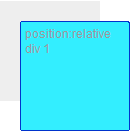
Where the grey part is the designated space.
The elements next to it in flow use the designated space as the “real” place of the element. So when you place a div right under the element pictured above, it looks like this:
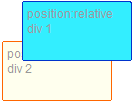
See how the positioned element sits above the one below it?
Position:absolute;
Absolutely positioned elements are a very different beast altogether. The biggest difference is that an absolutely positioned element gets taken out of the flow. This means that it doesn’t interact with other elements around it. The elements around it pretend that the element just simply doesn’t exist.
The top, right, bottom and left properties do something vitally different as well: The control the offset from the first parent element that is positioned relatively or absolutely. Unless you have elements in your CSS with position:relative, position:fixed or position:absolute, this is the root element, which is <html>. In the specifications, this is called the “initial containing block“.
So an absolutely positioned element with top:20px and left:20px within a relatively positioned element looks like this:
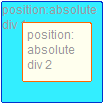
There are some problems with positioning absolutely, this article by paul’OB describes them quite well.
A fun trick with position:absolute is defining top and bottom or left and right without defining, respectively, a height or width. Since the standard value of those is auto, the element will size to fill the space. Unfortunately this does not work in Internet Explorer.
Position:fixed;
Fixed is somewhat of an unknown value, mostly because Internet Explorer 6 (thanks Laura!)does not support it. Fixed does essentially the same as position:absolute with one vital difference: It doesn’t take its offset from a parent element, but always from the viewport, your browser window. This essentially means that, when you scroll, the element stays visible and doesn’t move with the rest of the page. Forever taunting your efforts from it’s fixed positioning, smirking as your futile attempts to move it continue to fail…Sorry, I got carried away there. Anyway,
Z-index
Another property coming into play with positioning is Z-index. This property allows you control which absolutely, fixed or relatively positioned element is placed on top. Z-index on any element without position:absolute, position:fixed or position:relative does nothing.
To understand Z-index, one bit of the specifications is rather important:
In CSS 2.1, each box has a position in three dimensions. In addition to their horizontal and vertical positions, boxes lie along a “z-axis” and are formatted one on top of the other.
This is called “Stacking”, and a number of elements stacked on top of each other is called a “stacking context”. I suggest you try not read the specifications on this, they are very technical and difficult to follow.
Worth noting though, is that every time you declare a Z-index, you create a new “stacking context”. This essentially means that any element within the current element will use the parent’s Z-index as a starting point. This is better explained with the following example. Using this CSS:
.relativeblock1 {
position:relative;
width:200px;
height:80px;
z-index:51;
}
.absoluteblock1 {
position:absolute;
left:10px;
top:90px;
width:40px;
height:40px;
z-index:1;
}
.relativeblock2 {
position:relative;
width:200px;
height:80px;
z-index:50;
}
And this HTML:
<div class="relativeblock1">
<div class="absoluteblock1"></div>
</div>
<div class="relativeblock2"></div>
Then those two combined will give this image:
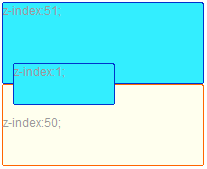
Can you see how, even though .relativeblock2 had a much higher z-index (50), it is below .absoluteblock1, which only has a z-index of 1? This is because .relativeblock1, with a z-index of 51, made a new stacking context where the z-index of .absoluteblock1 can be seen as “51.1″. For a more thorough explanation, read this article on stacking in CSS by Tim Kadlec or check Krijn Hoetmer’s test case.
This concludes the first part of the series. The next article in this series will be about floating and some of the more advanced uses of display. See you next week!
Update: part two of Understanding CSS positioning is posted, check it out!

95 comments
Cool idea for an article. I’m looking forward to part two and three.
One note concerning
z-index, you didn’t mention that Internet Explorer hasn’t implementedz-indexconforming the specifications. If you really want to do the magic with it, it will not work in IE.You might want to be more specific about IE. It’s IE6 that won’t respect position:fixed, for example. IE7 (at least when not in a transitional doctype) *does* support it.
I would also like to add that IE *will* let you specify a width on inline elements. That’s incorrect – if specified for inline elements, the width property should be ignored by the browser.
Understanding CSS Positioning part 1 | KilianValkhof.com…
Without a doubt positioning or the layout is the hardest part of CSS Not only because it ever so often varies between browsers but also because CSS has a…
[...] http://kilianvalkhof.com/2008/css-xhtml/understanding-css-positioning-part-1/ Posted by Kurt S. Filed in Classes, Resources Tags: CSS [...]
[...] Go! And then Share and Enjoy: These icons link to social bookmarking sites where readers can share and discover new web pages. [...]
[...] recomendar la lectura de este artículo (en inglés) en el que se resumen muy bien cómo funciona el posicionamiento de elementos en [...]
Nice article. I’m looking forward into reading the next parts.
Completely off-topic : There are some “it’s” that are in reality “its” in that article :)
Laura, NatalieMac and Thierry, thank you, I have updated the article accordingly! :)
[...] donde se explica de manera muy clara el posicionamiento de elementos en CSS. En inglés. 0 [...]
[...] Valkhof is running a series of articles called Understanding CSS Positioning of which the first part is now available. A good read before starting the conversion of your design [...]
[...] Understanding CSS Positioning part 1 | KilianValkhof.com (tags: css layout) [...]
[...] Understanding CSS Positioning part 1 – KilianValkhof.com Introduktion till css-positionering. (tags: css webdesign layout positioning) [...]
This is what I looking for, thanks bro
[...] Understanding CSS Positioning part 1 | KilianValkhof.com (tags: css design HTML tutorial webdesign) [...]
[...] me traía muy confundido, pero me encontré con este excelente post de Kilian Valkhof llamado Understanding CSS Positioning part 1 y tiene unos gráficos que creo que a más de uno les va a dejar las cosas muy claras sobre todo [...]
[...] Understanding CSS Positioning part 1 | KilianValkhof.com [...]
Pardon me to ask, with the display set to ‘block’, how can I have another element on the same line? If I change it to inline, then it will affect the rest of the design code.. (take a look at my site)
I’m struggling to display no. of post in each category…
Any advise is appreciated…
Hey Yan,
Check back on monday for the second part of my article :) (I’ve also sent you an email with some pointers ;) )
I appreciate your time to email me. I’ll surely be back on Monday for lesson #2.
Have a great weekend.
Thanks for this guide, i am waiting for next Parts now
Thanks alot for This Value information there is just a wired situation happens to me whenever i user relative position and give it like top:50px; it always reserve the 50px bellow the div or the object that i apply to it!
do you have an answer Pleaseeeeee?
Thanks
[...] Understanding CSS Positioning part 1 [...]
[...] primo articolo introduce i tipi di posizionamento possibili e le loro caratteristiche, con immagini ed esempi chiari, sebbene il tutto sia in [...]
[...] more display properties than just block and inline. We’ve already covered those properties in part 1, so if you haven’t read it yet, start there [...]
[...] Understanding CSS positioning part I Understanding CSS positioning part II [...]
[...] Understanding CSS Positioning part 1 [...]
[...] any dimensions specified in the CSS. (Internet Explorer will, incorrectly, let you do this. Thanks NatalieMac!) Another opposite is that, as the name suggest, these elements are displayed in-line, so they will [...]
[...] part one and part two we’ve discussed the positioning, display and floats properties of CSS2. In the [...]
[...] Part 1 – Covers “display” and “position” [...]
[...] http://kilianvalkhof.com/2008/css-xhtml/understanding-css-positioning-part-1/ [...]
[...] e grazie per la visita!Introduzione Questo tutorial è una traduzione dell’articolo chiamato “Understanding CSS Positioning part 1″ di Kilian [...]
[...] sezione tutorials troverete la traduzione della prima parte dell’articolo chiamato “Understanding CSS Positioning part 1” chiamato “Il posizionamento CSS (prima [...]
[...] Part 1 | Part 2 | Part 3 [...]
[...] Part 1 | Part 2 | Part 3 [...]
[...] is left back there in the storage room behind my retinas. I’ll read and re-read stuff like this article on CSS positioning that I sorta know in hopes that in a few years I’ll really know it [...]
Decently good article. Seeing that this is an article about CSS more than one about browsers that don’t support CSS I don’t think you have to worry about the IE conditionals and hacks. Teach the right way – then come back and teach how to make browsers gone wild.
[...] Understanding CSS Positioning part 1- An interesting series of articles that doesn’t only cover positioning, but also properties that [...]
[...] Understanding CSS Positioning part 1- An interesting series of articles that doesn’t only cover positioning, but also properties that [...]
[...] only happens on elements in normal flow under each [...]
[...] me traía muy confundido, pero me encontré con este excelente post de Kilian Valkhof llamado Understanding CSS Positioning part 1 y tiene unos gráficos que creo que a más de uno les va a dejar las cosas muy claras sobre todo [...]
[...] confuso y difícil de dominar por completo. Pero en el blog de Kilian Valkhof un artículo llamado “Comprendiendo el posicionamiento en CSS” nos da unos cuantos ejemplos que son de mucha [...]
[...] 31, 2008 in Uncategorized I liked this article by Kilian Valkhof because it clearly explained the various options for displaying elements in CSS and was kind of [...]
[...] 21. Understanding CSS Positioning [...]
[...] Understanding CSS Positioning part 1 [...]
[...] 9- 理解CSS定位Part 1 [...]
[...] Understanding CSS Positioning part 1- An interesting series of articles that doesn’t only cover positioning, but also properties that [...]
hi
I need more to learn with nested divs in HTML
Please help
thanks
Thanks for this
[...] la proprietà position, se non conosci a fondo questa proprietà ti consiglio la lettura di questo articolo che spiega nello specifico come capire le varie regole che si nascondono dietro al posizionamento [...]
I just start with div. Thanks for the lesson learned too many new
Excellent post. May be you’d like to make it perfect by correcting the reference of .absoluteblock2 to .absoluteblock1 as the actual class is of absoluteblock1 and this can be confusing to the newbies.
Can you see how, even though .relativeblock2 had a much higher z-index (50), it is below .absoluteblock2
[...] Source [...]
Well done. I appreciate you taking the time to write this. One of the better posts on the subjects you touched on.
[...] of the Day – Science Wiretapping by anyone – Legal Verisign Sitefinder Patent Approved – Internet CSS Positioning Part 1 – Software Digital TV will come as a surprise to some! – Media Wacko reveals hints to his power deice – [...]
[...] Understanding CSS Positioning, Part 1 – Kilian Valkhof [...]
[...] Understanding CSS Positioning part 1- An interesting series of articles that doesn’t only cover positioning, but also properties that [...]
Really fantastic article and we will be using it in our courses.
Thanks,
C
[...] Understanding CSS Positioning part 1- An interesting series of articles that doesn’t only cover positioning, but also properties that [...]
[...] of the new CSS3 layout modules. The first part will introduce the positioning and display property. Part1, Part2, Part3 gives you a deep understanding of the possibilities you have in [...]
Thank you,. another great tutorial I find that carves my pathway to full understanding CSS. I’m still a little bit oof but the Z-Index example gave me a better example of how to stack my content evenly.
Thanks.
Thanks Kilian, very well explained! Whereas the information is well covered on the web, It’s rare to find writing that covers it succintly and effectively – while still being engaging.
thanks so much for this great post of css
[...] pentru css stuff, like: http://www.smashingmagazine.com/2007/05/10/70-expert-ideas-for-better-css-coding/ kilianvalkhof.com/2008/css-xhtml/understanding-css-positioning-part-1/ [...]
[...] 9- 理解CSS定位Part 1 [...]
[...] Understanding CSS Positioning part 1- An interesting series of articles that doesn’t only cover positioning, but also properties that [...]
Thanks for the article, this will be a very useful resource!
[...] http://kilianvalkhof.com/2008/css-xhtml/understanding-css-positioning-part-1/ Get the RSS Feed January 25, 2010 at 5:27 pm by Bharat | Category: CSS | [...]
What about Display:Inline-Block?
Great post thx!
[...] 5, 2010 I will be using this 3-part article for my HTML/CSS class next week – it’s a worthy read! Posted in Uncategorized | Leave [...]
[...] the layout. Several possible workarounds are detailed in this post. [color=Teal]CSS Positioning 9- Understanding CSS Positioning part 1- An interesting series of articles that doesn’t only cover positioning, but also properties that [...]
[...] 理解CSS定位Part 1 [...]
[...] Understanding CSS Positioning Part 1 – via Kilian Valkhof [...]
Gracias por la claridad de tu artículo, muy util!
Hello Kilian,
Thanks so much for this post, I’ve been desperately looking for CSS tutorial on the Net :)
By far the best article I’ve seen on CSS tags like position, display, z-index, and how to deal with floats.
[...] 9- 理解CSS定位Part 1 [...]
[...] 9- 理解CSS定位Part 1 -一系列很有趣的文章,这些文章不仅包括定位,还包括包括定义布局的属性,比如display和float ,和对CSS3 布局模型的一个预览。第一部分将会介绍定位和display属性。 Part1, Part2, Part3 将会带给你对定位的更深的理解. [...]
Something wierd is going on with the bottom of this page. It may be because either you or some one else copied text from Microsoft Word and put on the internet. I see a bunch of little squares.
These are squares on my computer.
一系列很有趣的文章,这些文章不仅包括定位,还包括包括定义布局的属
[...] Understanding CSS Positioning part 1- An interesting series of articles that doesn’t only cover positioning, but also properties that [...]
Thank you for this website.It’s a little bit difficullt understanding HTML and CSS when your creating your website by your self , but that the beauti ot it. thanks again.
[...] Understanding CSS Positioning part 1- An interesting series of articles that doesn’t only cover positioning, but also properties that [...]
[...] spot in the layout. Several possible workarounds are detailed in this post.CSS Positioning9- Understanding CSS Positioning part 1- An interesting series of articles that doesn’t only cover positioning, but also properties that [...]
[...] Understanding CSS positioning, part 1 [...]
[...] of the new CSS3 layout modules. The first part will introduce the positioning and display property. Part1, Part2, Part3 gives you a deep understanding of the possibilities you have in [...]
short base: http://w3-help.com/CSS/1316021426,Positioning
thanks for the informative css toturial .. it is really helpful :)
Thanks :)
Thanks a lot!!
In many many opportunities I think css is great, and in others I think “why cant I simple vertical align!!!” or things like that.
Thank for the guide.
Fantastic! A tremendous explanation for those of us who can’t flex our css-muscles, because we don’t yet have them.
Thanks!!!!
Lots of spam comments here around this great post.
Men, you are scratching my head with your comments :)
[...] Part 1 | Part 2 | Part 3 [...]